-800x800.jpg "Quick Order Form for OpenCart: Simplify Shopping (v. 1.5-4.*)")
Quick Order Form for OpenCart: Simplify Shopping (v. 1.5-4.*)
Simplify shopping with Quick Order Form for OpenCart. Enable fast one-click purchases, streamline checkout, and boost customer satisfaction and conversions
$18.00
$25.00
Available Options
Tags: Быстрый, заказ, Quick, Order, Form, easy buy, in one click, in 1 click, cs-cart, cscart



.png)
 Overview:
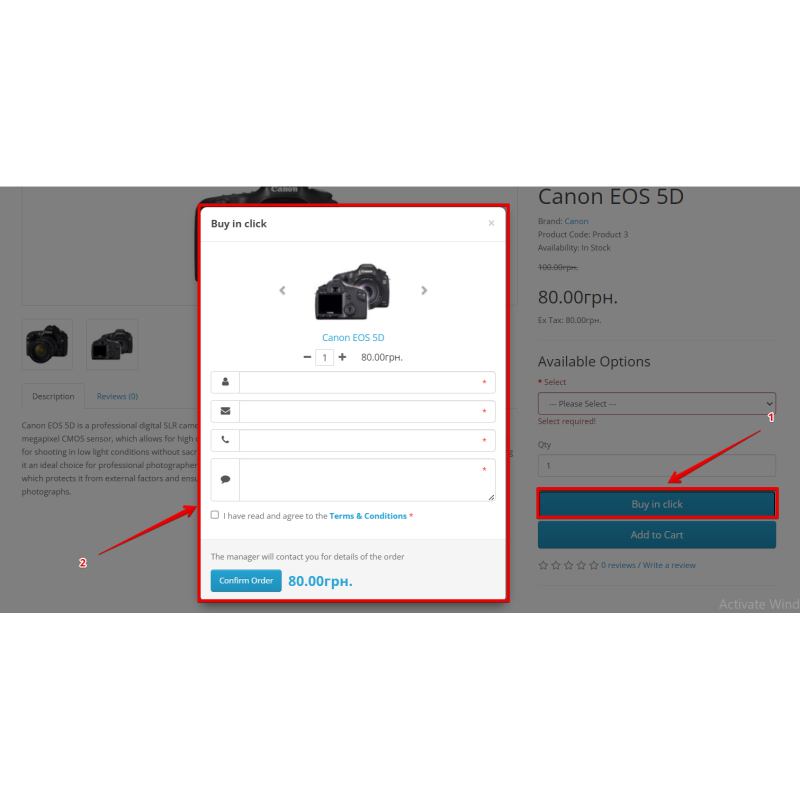
Quick Order adds a "Buy in Click" button to your OpenCart product pages and lets customers place an order through a short pop-up form instead of walking the whole cart-and-checkout path[cite: 17]. The shopper enters only the fields you ask for — name, phone, e-mail, comment — picks the quantity, and submits[cite: 17]. The lead lands in a dedicated admin grid where your team can call back, confirm and turn it into a real OpenCart order with one button[cite: 17].
Most carts are abandoned because checkout is too long, asks for too much, or breaks on a small screen[cite: 17]. A one-click order form removes that friction: no account, no multi-step checkout, just the contact details you actually need to confirm the sale[cite: 17]. That is exactly where mobile conversion is won — fewer steps, fewer fields, fewer reasons to leave[cite: 17]. For high-consideration goods, made-to-order items, or stores that close every sale by phone, the quick form is often the primary way customers order at all[cite: 17].
You control which fields appear and which are mandatory, so the form stays as short as your sales process allows[cite: 17]. Optional e-mail notifications alert your team the moment a lead arrives, so no quick order sits unanswered[cite: 17]. Every submission is stored with the product, quantity, page URL, customer comment and timestamp, giving your sales staff full context before they call[cite: 17].
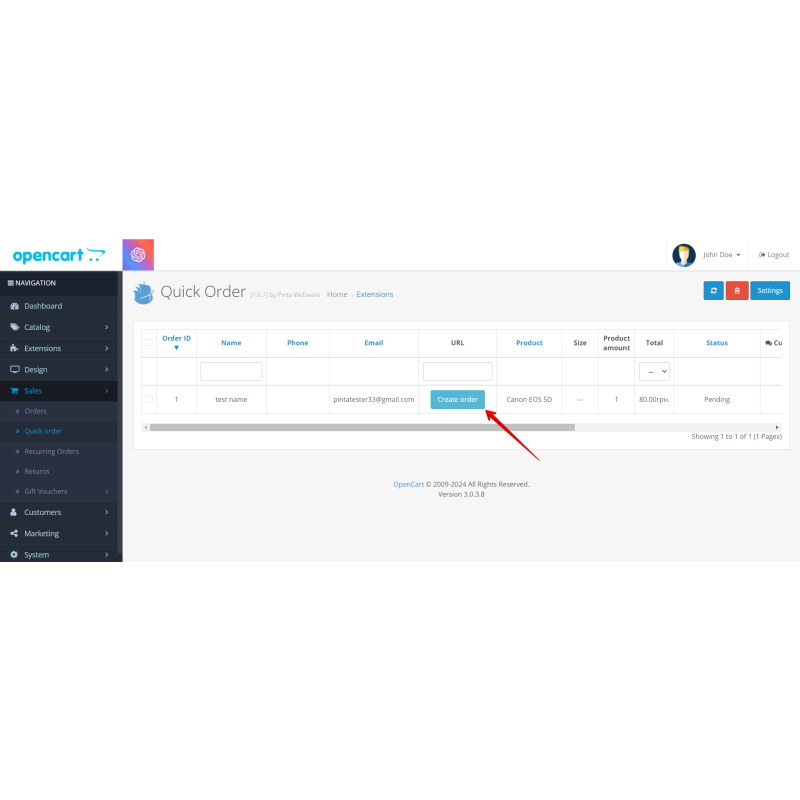
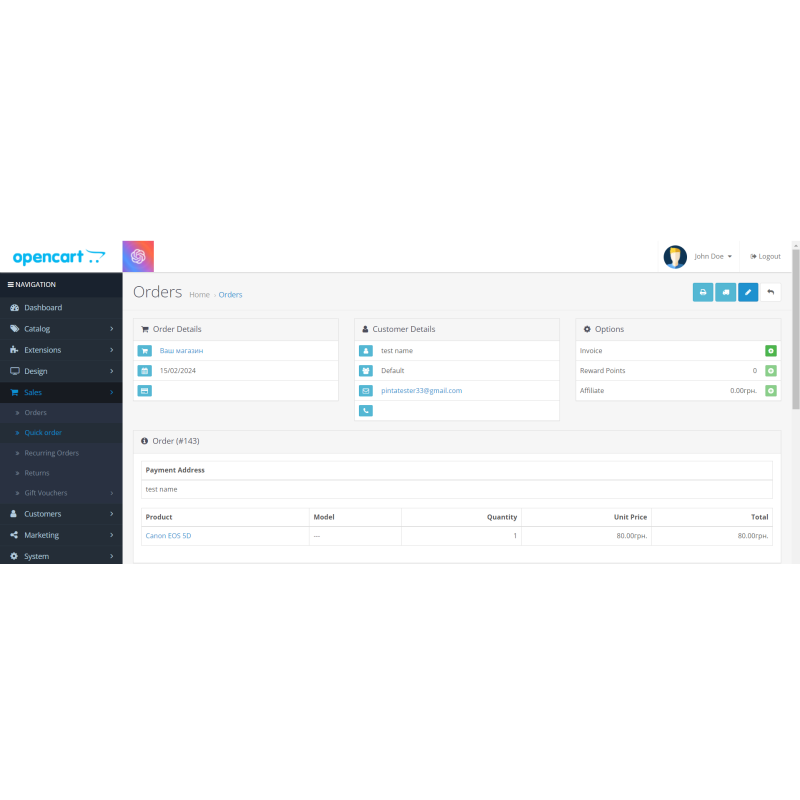
The form is built for production[cite: 17]. A built-in Google reCAPTCHA v2 ("I'm not a robot" checkbox) is available across every OpenCart generation — 1.5, 2.0, 2.3, 3.0 and 4.x — and is fully self-contained (no external captcha extension required)[cite: 17]. An invisible honeypot field and server-side validation (required-field enforcement, e-mail/phone format checks and length caps) reject spam and malformed submissions before anything is written or e-mailed[cite: 17]. From the admin Quick Order grid, the "Create order" button converts a confirmed lead into a standard OpenCart order that appears in Sales > Orders[cite: 17].
Supported versions:
OpenCart 1.5 (vQmod), 2.0, 2.3, 3.0 and 4.x — a separate build per generation[cite: 17]. Built-in reCAPTCHA v2 is available on all five trees[cite: 17].
Key Features (Why choose)
- One-click order trigger: Adds a "Buy in Click" button on every product page to place orders without registration or a cart footprint[cite: 17].
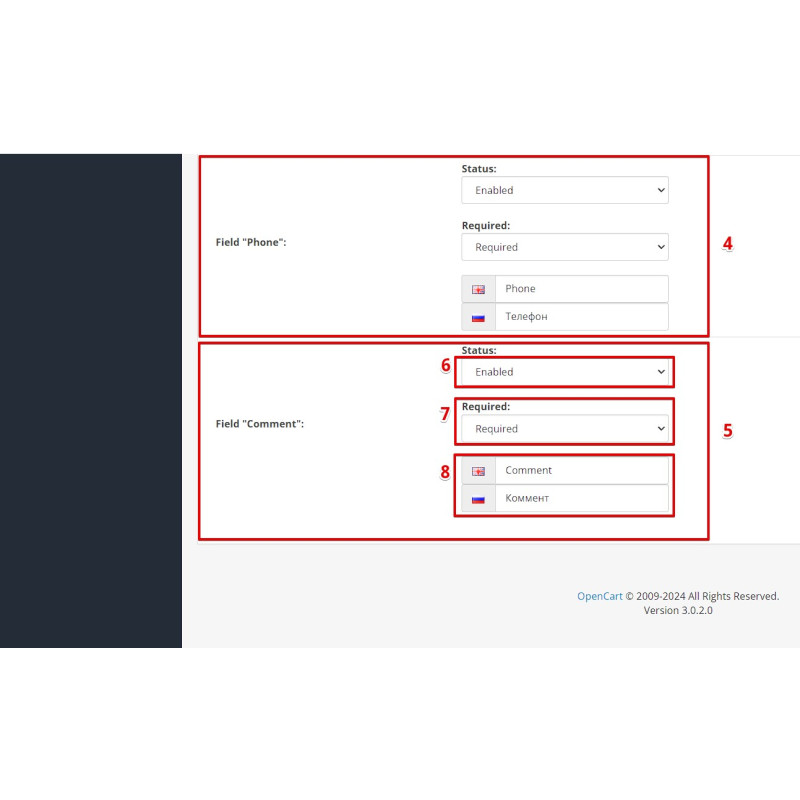
- Configurable modal form: Choose which fields among name, phone, e-mail, and comment show and which are strictly required[cite: 17].
- Contextual lead tracking: Captures the selected product, quantity, direct page URL, and customer comment with every entry[cite: 17].
- Seamless backend conversion: Convert any confirmed entry into an official standard OpenCart order via the admin grid[cite: 17].
- Rigid anti-spam infrastructure: Built-in invisible honeypot field plus server-side validation enforces required elements, formats, and length caps[cite: 17].
- Self-contained captcha: Native Google reCAPTCHA v2 support across ALL OpenCart generations (1.5 to 4.x) with zero external extension dependencies[cite: 17].
- Standardized architecture: Distributed as a separate, native build for each OpenCart generation to unify your management tool across multiple stores[cite: 17].
Key Features / How it works
Modal Order Layout: The injected product page button triggers a short pop-up form featuring an integrated quantity selector and real-time total math[cite: 17].
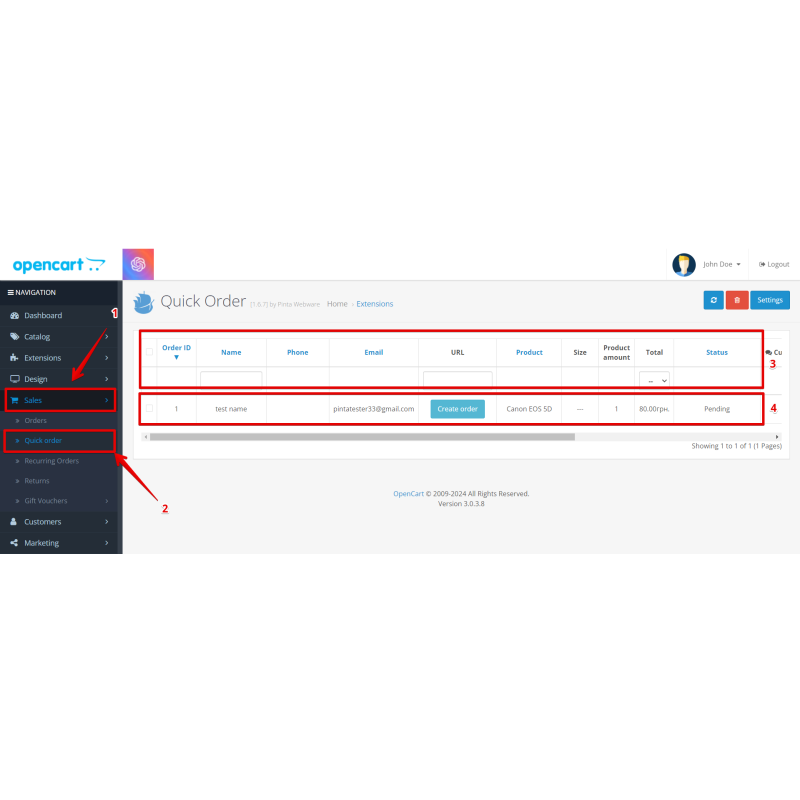
Advanced Grid Dashboard: Review detailed incoming leads, attach private staff notes, and convert leads dynamically into core Sales > Orders entries[cite: 17].
Secure Order Resolution: Converted entries are resolved safely in the system so that they are immediately visible in the native OpenCart orders list[cite: 17].
Server-Side Captcha Audit: Form validation executes server-side cURL verification routines against Google's siteverify endpoint before any lead is saved[cite: 17].
Theme Adaptability: Developed natively to ensure plug-and-play storefront compatibility with default layouts and custom Journal theme variants (where applicable)[cite: 17].
How to use
- Download the package build that matches your store's target version (1.5 vQmod, 2.0, 2.3, 3.0 OCMOD, or 4.x OCMOD)[cite: 17].
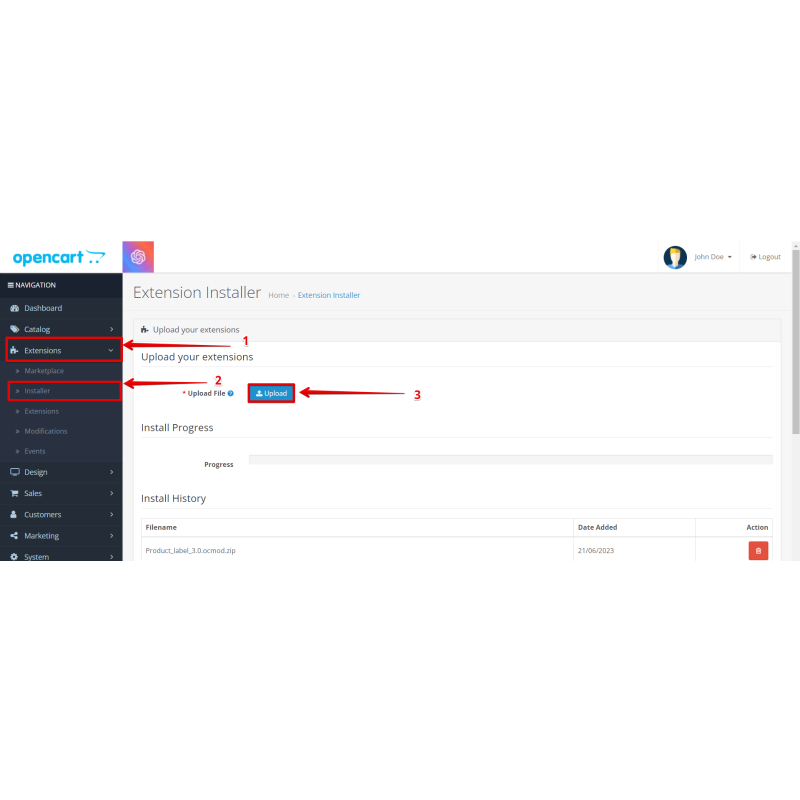
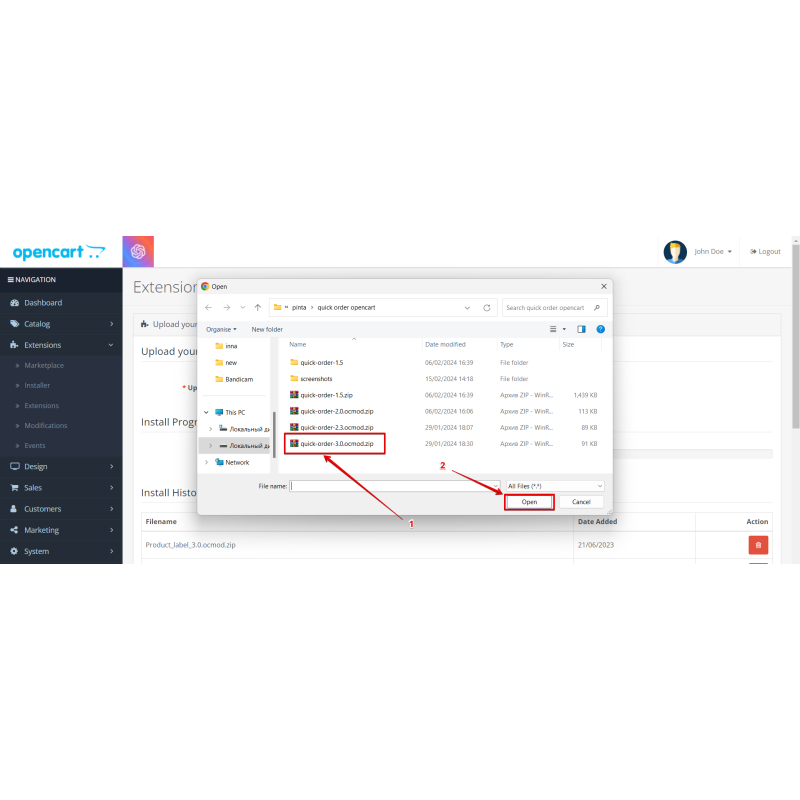
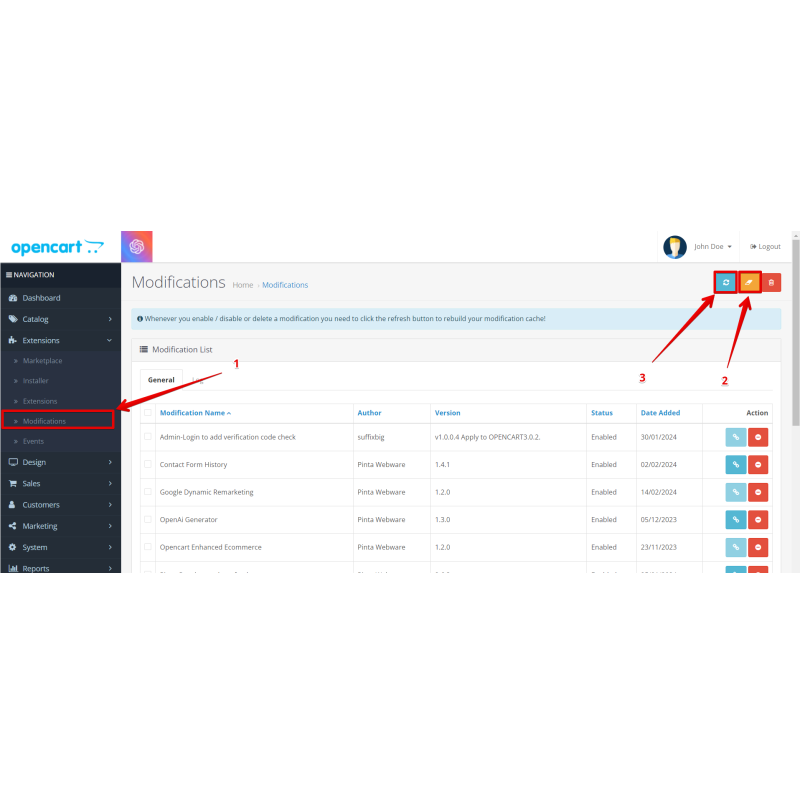
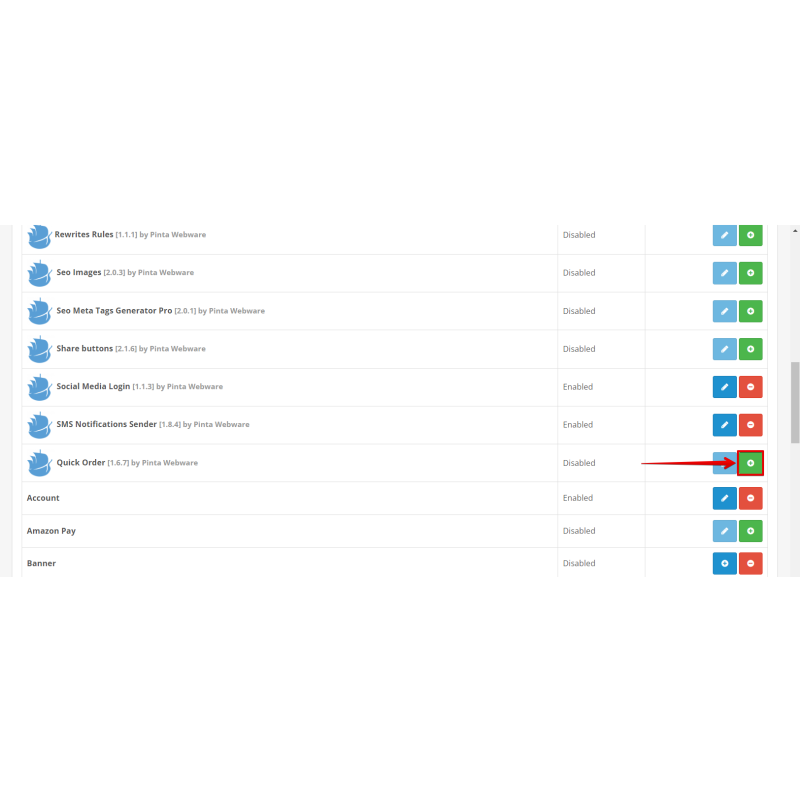
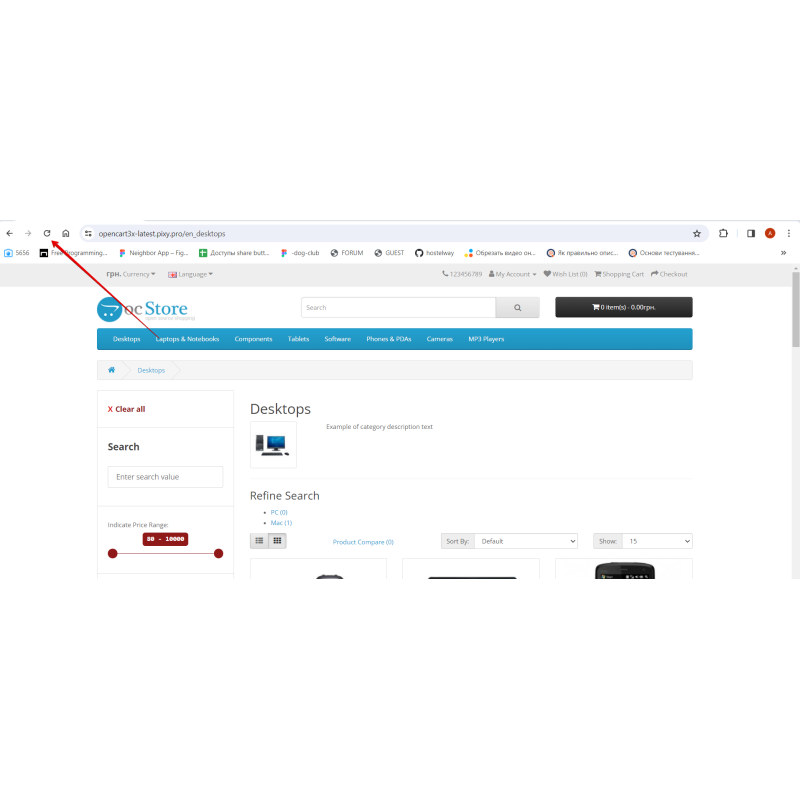
- Install the module: on OpenCart 2.3 / 3.0 / 4.x upload the OCMOD ZIP via Extensions → Installer, then apply updates via Extensions → Modifications → Refresh; on 1.5 use the vQmod directory path; on 2.0 copy files directly[cite: 17].
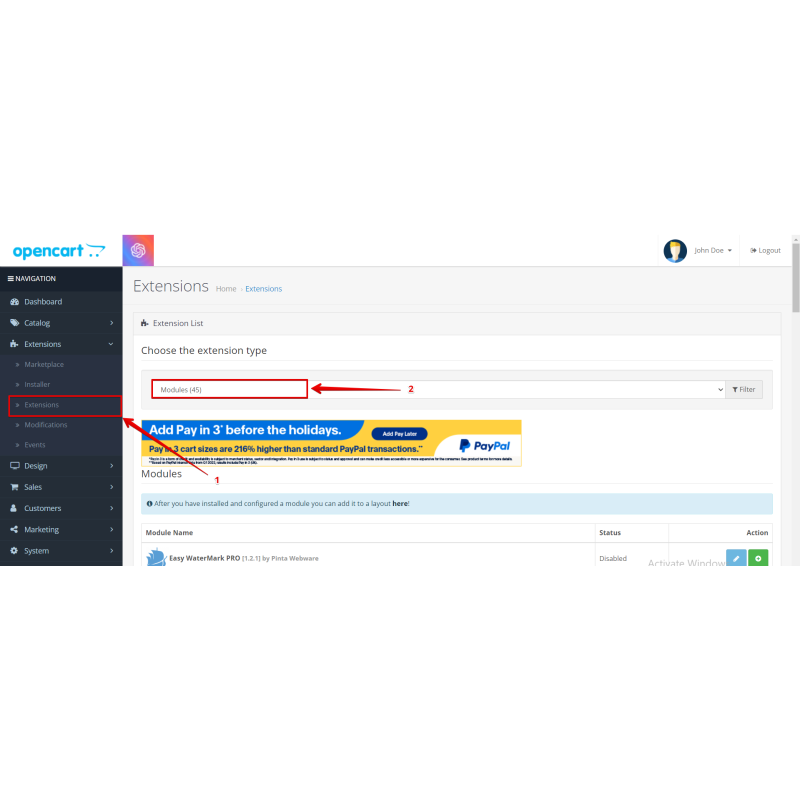
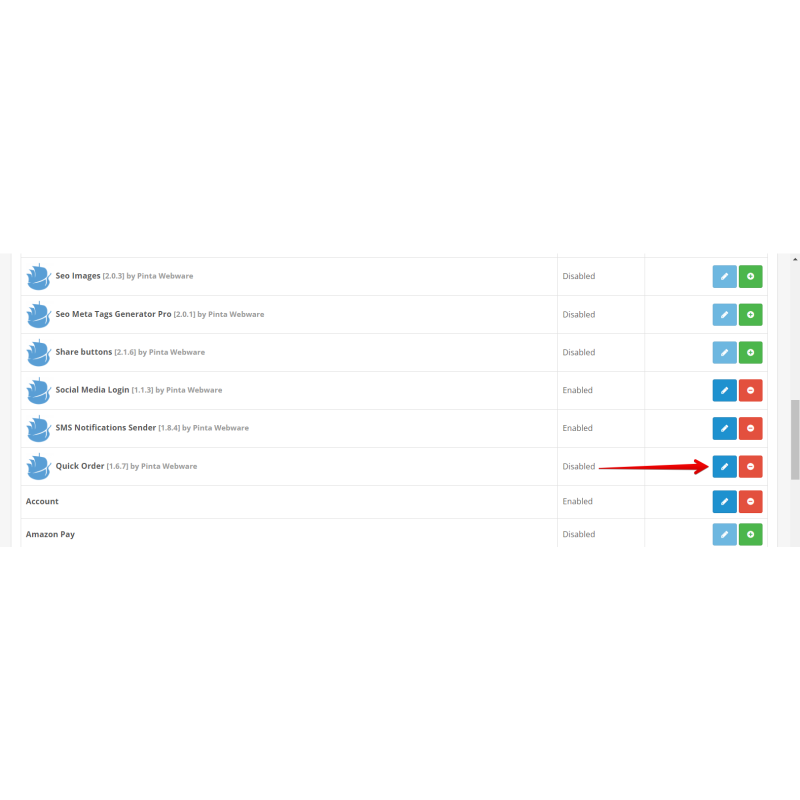
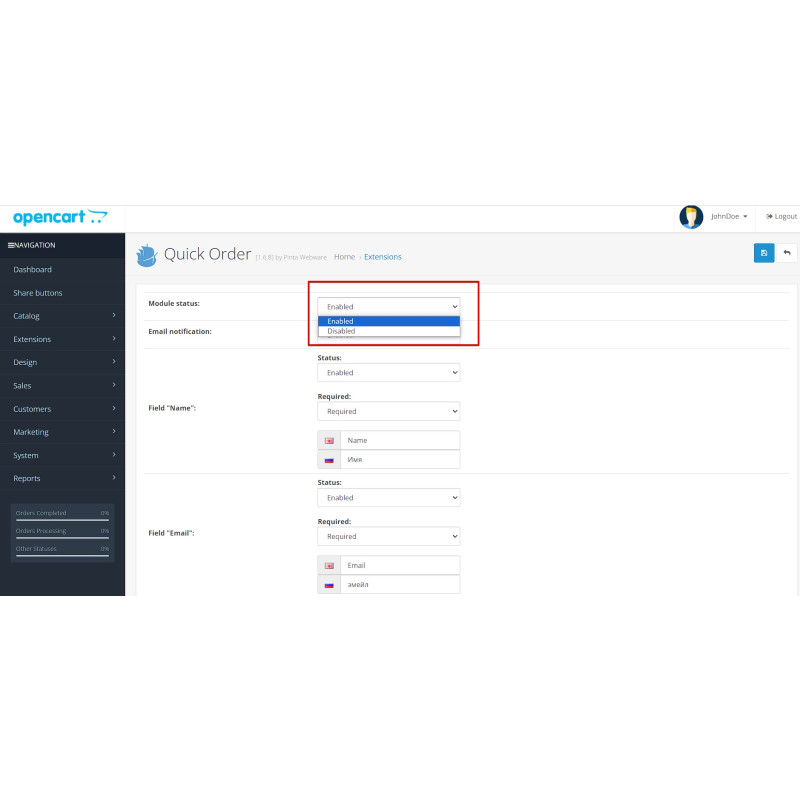
- Navigate over to the modules panel (under Extensions → Modules or Extensions → Extensions → Modules) and switch Quick Order to active[cite: 17].
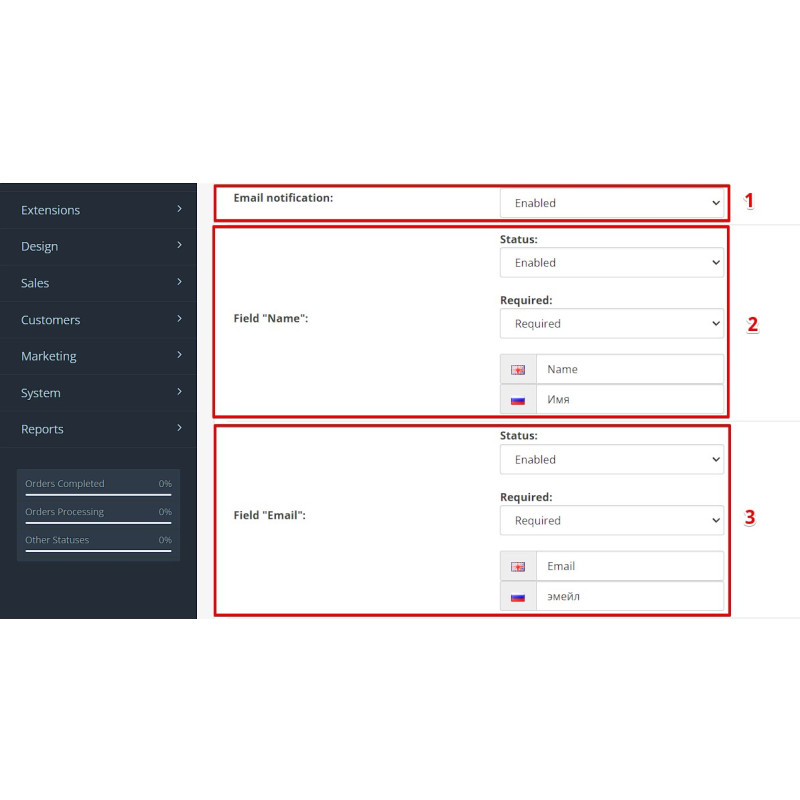
- Configure the modal pop-up: choose your preferred visual fields (name, phone, e-mail, comment), mark mandatory rules, and enable optional admin email notification recipients[cite: 17].
- (Optional) Activate Google reCAPTCHA v2 protection by toggling it on and pasting your official keys[cite: 17].
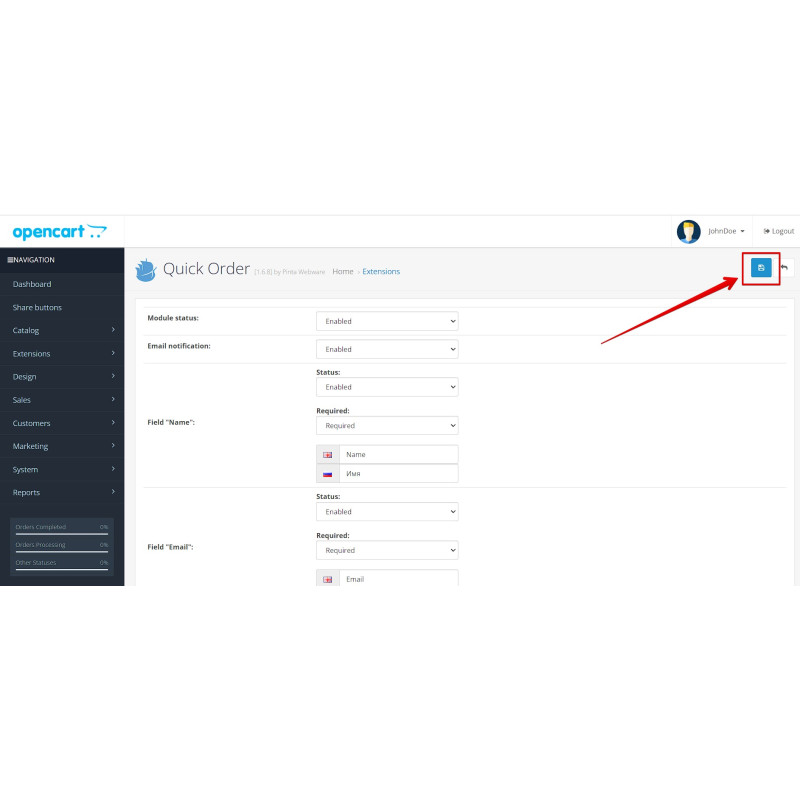
- Save changes. The active button will render live across product pages, and incoming listings can be converted seamlessly into full shop orders[cite: 17].
Video Instructions
What's new
OC4.x 1.8.2 / OC1.5 1.7.1 / OC2.0 1.7.3 / OC2.3 1.7.3 / OC3.0 1.7.3 (2026-06-15) — Built-in reCAPTCHA v2 ported to OpenCart 1.5, 2.0, 2.3 and 4.x, matching OC3 and dropping the external captcha dependency[cite: 17]. OC3 admin "Create order" fixed so the order reliably reaches Sales > Orders (PHP warnings no longer pollute the JSON response); quick-order e-mail send suppressed so a broken SMTP host can't break the AJAX response[cite: 17].
OC4.x 1.8.1 (2026-06-12) — Fixed the admin "Create order" button so the order always appears in Sales > Orders (status resolved + history guarded); cleaned undefined server-variable reads that polluted the JSON response[cite: 17].
OC4.x 1.8.0 (2026-06-12) — Added Google reCAPTCHA v2 bot protection to the OC4 "Buy in Click" form (toggle + site key + secret), verified server-side before the order is saved[cite: 17].
OC3.0 1.7.3 (2026-06-15) — OC3 build enhancements: added self-contained reCAPTCHA v2 functionality (removes external captcha extension dependencies) and corrected a stale version label inside the admin panel[cite: 17].
OC4.x 1.7.2 (2026-06-12) — Fixed dead "Buy in Click" button on OC4 caused by 404 catalog CSS/JS (asset paths made root-relative)[cite: 17].
Our Reviews
Related Products
-600x600.jpg "Simple Checkout for OpenCart: Streamlined One-Page Experience (1.5-4.x)")
Simple Checkout for OpenCart: Streamlined One-Page Experience (1.5-4.x)
$18.00
$35.00
Ex Tax:$18.00
-600x600.jpg "SEO Meta Tags Generator Pro for OpenCart 1.5-4.x")
SEO Meta Tags Generator Pro for OpenCart 1.5-4.x
$20.00
$35.00
Ex Tax:$20.00
-600x600.jpg "Redirect URLs Manager - 301, 302, 307 and 404 SEO optimizer for OpenCart (v. 1.5*-4.*)")
Redirect URLs Manager - 301, 302, 307 and 404 SEO optimizer for OpenCart (v. 1.5*-4.*)
$20.00
$29.99
Ex Tax:$20.00
-600x600.jpg "SMS Notifications for OpenCart: Simplify Communication (v. 1.5-4.x)")
SMS Notifications for OpenCart: Simplify Communication (v. 1.5-4.x)
$30.00
$50.00
Ex Tax:$30.00
$60.00
Ex Tax:$60.00
-600x600.jpg "Image Compress with Squeezeimg for OpenCart (v. 1.5*-4.*)")
Image Compress with Squeezeimg for OpenCart (v. 1.5*-4.*)
$0.00
Ex Tax:$0.00
-600x600.jpg "Customizable Product Labels for OpenCart (v. 2.*-3.*-4.*)")
Customizable Product Labels for OpenCart (v. 2.*-3.*-4.*)
$20.00
$32.00
Ex Tax:$20.00
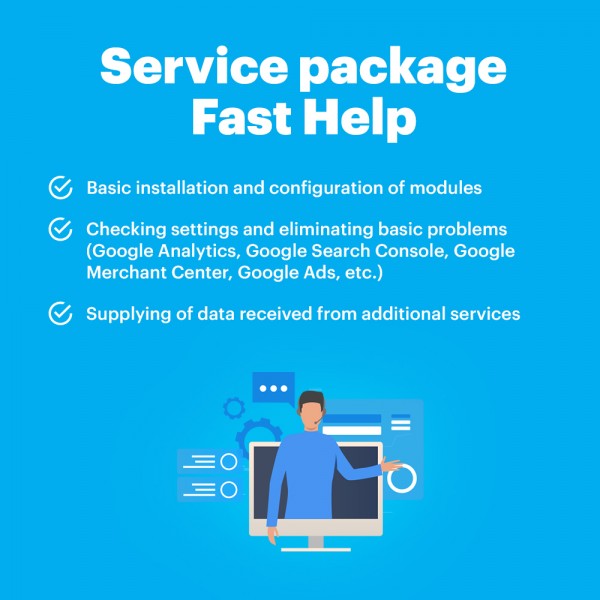
Package Service Fast help in an hour
$30.00
Ex Tax:$30.00